

According to the Richmond Fed, over the past 50 years (from 1970 to 2020), U.S. construction productivity has fallen by more than 30%, while the rest of the economy nearly doubled.
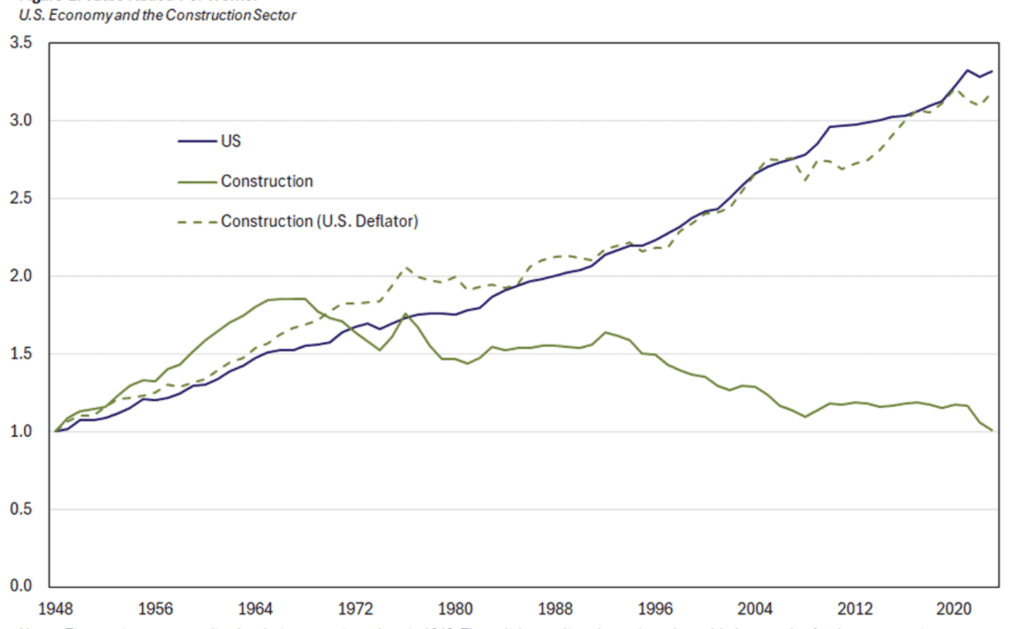
It's because many construction companies are still running core financial and operational processes the same way they were 20 years ago, on spreadsheets, through email, and with a lot of manual effort holding it all together.
If you are looking for reliable construction automation solutions but aren't sure which tasks to prioritize, this article has your answer.
You will learn what automation in construction industry means in practice and the six processes you should focus on first to automate your construction business.
What Is Construction Automation?
Some people hear "automation in construction" and immediately picture robots laying bricks on a job site, or autonomous bulldozers grading a site without a human operator. While that is a part of it, it's not everything automation has to offer.
For most construction companies, construction automation is about the tasks in the back office. When they say they want to automate parts of their business, they're talking about the systems and workflows that manage the financial, operational, and administrative side of the business.
Yes, there are a lot of tasks on that side of the work that can benefit from automation. For example, a construction management process on any given project has:
Budgets to track
Schedules to manage
Invoices to process
Subcontractors to coordinate
Documents to version-control
A WIP report for your surety, bank, and executive team
All of that is managed manually in most places through paper-based or manual workflows. And those manual workflows take a huge amount of time and energy to operate. Not to mention the errors that come with manual work.
So when you automate these tasks, you're not only achieving faster speeds but also more accuracy than before.
Let's get into more details about automating the tasks we listed above and their impact.
The 6 Construction Processes You Should Automate
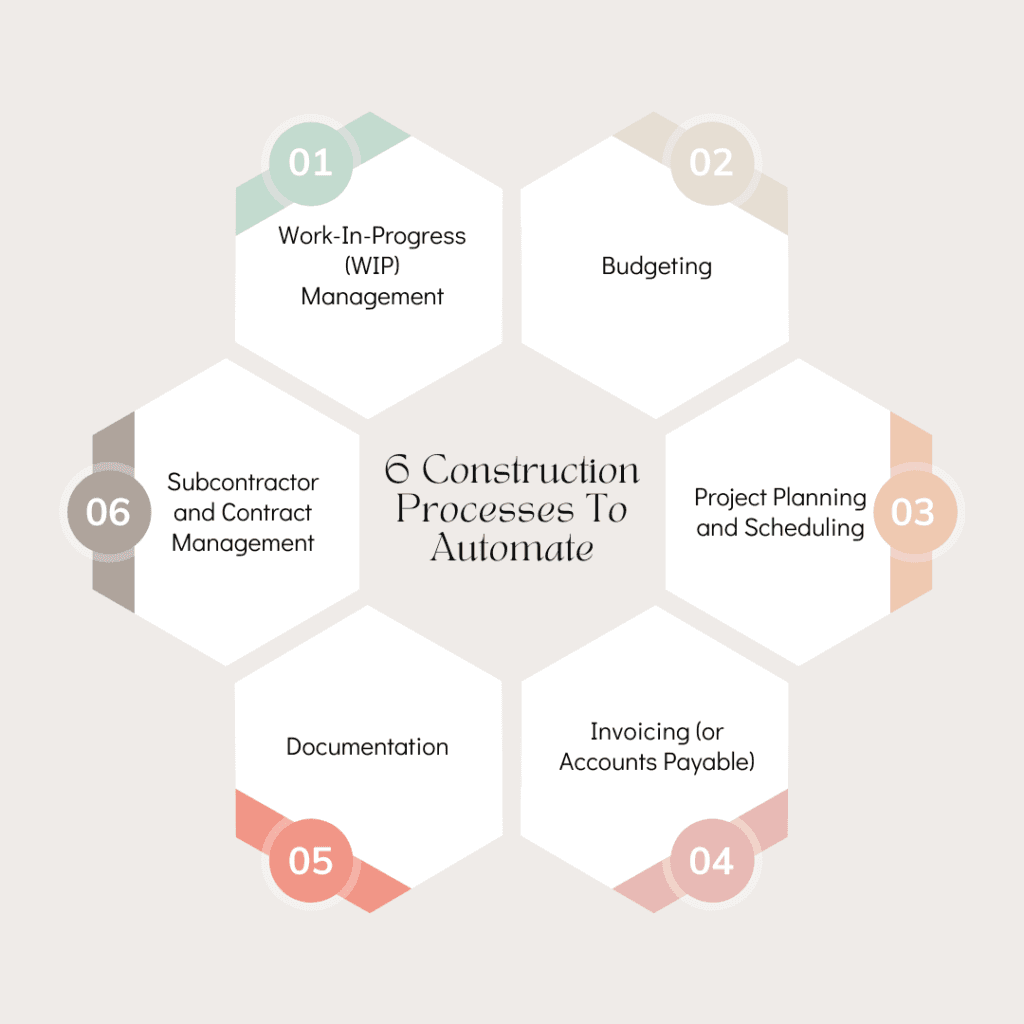
Here are the six most important processes you should focus on first to automate your construction business.
1. Work-In-Progress (WIP) Management
A Work-in-Progress (WIP) report combines data from your product manager's forecasts, your job costs, your contract values, and your billing status to report whether a job is generating profit or loss.
If any node in this entire chain is feeding incorrect data or no data at all, you won't have your finance statements as expected.
That's because the numbers from the WIP schedule are what help in calculating the percentage complete of a job. This calculation in turn drives your over and under-billing journal entry, which is the biggest single driver of your monthly P&L and balance sheet.
Automation in construction can fix this process and do it in the most efficient way ever. Here are a few things that change when you automate WIP management:
Forecasts from all PMs automatically get stored in the system
Over and under-billing GL transactions get created automatically
The data used by finance and operations teams is the same
Audit trail paints the complete picture from start to end
Apart from just closing the books faster, automated WIP management also gives you insights through advanced dashboards that a static spreadsheet simply cannot.
2. Budgeting
Construction budgeting has always been a complicated thing because so many things are bound to change mid-project.
The job might be doing just as budgeted in month one. But by month three, the actuals could be incurring way more costs than what was initially budgeted.
The traditional approach is to let costs go over the budget and manually reconcile everything at the end of the month. But that's a reactive approach. It doesn't prevent things from falling out of budget.
Automated construction budgeting helps you forecast budgets accurately based on reality. It also has a mechanism to alert you of mid-month changes in real-time, so you can do something about it while there is still time.
Here is how manual budgeting compares to automated budgeting:
Feature | Manual Budgeting | Automated Budgeting |
|---|---|---|
Budget updates | End of the month | Real-time, as costs are logged |
Change order tracking | Updated manually and often too late | Auto-synced to budget and forecast |
Variance alerts | Discovered after the fact | Triggered automatically at set thresholds |
Forecast accuracy | Dependent on manual inputs | Driven by live cost and schedule data |
Version control | Multiple spreadsheet versions | Single source of truth in the system |
Time to generate reports | Hours | Minutes |
3. Project Planning and Scheduling
It's no secret that most construction projects fail to deliver on time or to quality standards.
A big part of that is due to the same reason projects fail to deliver within budget. And that reason is the lack of a dynamic system that could respond to change in real-time.
A construction company needs to schedule for variables such as the following:
Crews
Subcontractors
Materials
Equipment
Weather
Inspections
Permit timelines
Client with a fixed completion date
There are a lot of variables to schedule and be right about. You cannot stop things from changing mid-project. But you can have a system in place that could react to the changes and adjust the schedule accordingly on its own.
And that system is what automation gives you. Automated scheduling has the following benefits:
The dependent variables of a task adjust automatically if that task faces a delay
If two or more jobs need the same crew or some other resource at the same time, the system informs you about that conflict in advance
Things are communicated to subcontractors on time
Project managers have the timeline of all tasks in front of them
4. Invoicing (or Accounts Payable)
In manual construction AP, the room for error is enormous.
That's because the process involves too much manual entry of data. And this also doesn't leave much time for the AP team to invest in tasks that require human judgment.
Automated construction fixes that as well.
Here's how things work when invoicing is automated:
OCR and AI capture invoice data automatically
Invoices get matched against purchase orders automatically
Approval routing happens digitally
Every invoice has a full audit trail
The invoicing lifecycle is cut down by several days
The last improvement in particular has a direct impact on subcontractor relationships, and in construction, your relationships with good subs and suppliers are a competitive advantage.
5. Documentation
A single construction project generates plenty of documents. For instance, look at the sheer number of types of documents below:
Contracts
Subcontracts
Change orders
RFIs
Submittals
Drawings
Permits
Inspection reports
Lien waivers
Insurance certificates
Daily logs
Safety documents
And if a dispute or a compliance review comes up, that generates a separate paper trail.
But that's not an issue. Documentation in construction is like that by default. The problem is how most construction companies manage all of this.
In most places, there's no central resource base to hold all the different documents in an organized manner. Instead, the documents are scattered in random places. They could be lying in email threads, shared drives, physical folders, or whatever place each individual PM saw fit for storage.
So there's a dire need for automation here as well.
An automated document management system is a single source of truth for every document related to every project.
The system classifies every new document on its own. This system also ends version control issues and approval bottlenecks by providing a reliable data foundation for all your financial reporting processes.
6. Subcontractor and Contract Management
On any given construction project, the majority of the work being done on-site is being done by subcontractors.
To make sure they keep working fine, general contractors need to manage the subcontractor relationships and contracts with a lot of care.
But what we see is that many general contractors manage their interaction with subs manually, which is an error-prone process.
Contracts live in email threads
Insurance certificates expire without anyone noticing
Change orders get processed in the project management tool, but nobody has visibility across the whole portfolio to see patterns
And disputes, when they come, are expensive
Automating subcontractor and contract management addresses all these problems and some more.
The table below shows how automation improves tasks that were being managed manually.
Task | Manual Approach | Automated Approach |
|---|---|---|
Insurance certificates tracking | Spreadsheet with manual expiry dates | Auto-flagged before expiry, and subs are notified automatically |
Contract version control | Email threads, multiple file versions | Single repository where the latest version is always current |
Change order visibility | PM tool only, no portfolio view | Centralized, searchable across all projects |
Payment application routing | Manual, paper-based, often delayed | Automated workflow, digital approvals, full audit trail |
Subcontractor onboarding | Ad hoc, inconsistent | Standardized, document checklist automated |
Dispute documentation | Reconstructed after the fact | Full history logged throughout the project |
Start Automating with Anterra
The six processes above are where construction companies lose the most time, make the most errors, and leave the most money on the table. Automating them and some other processes is your only way to prevent losses in the future.
And that automation can happen with Anterra Technology. Our solutions are purpose-built for the construction industry. With Anterra, you can automate:
AR collections
Financial statements
Job forecasting
Cash flow forecasting and more
Visit the Anterra website and explore all construction modules that you can use to automate your construction business.
Book a demo today and see how much easier and quicker your construction processes can get.


