

Construction is one of those industries that haven’t kept pace with technology the way it should have.
You see construction firms still managing their finances the old way when modern dedicated tools are there to tackle everything in one place. These companies track projects using siloed spreadsheets and PDFs, which is an error-prone approach.
There is an awareness gap that needs to be filled. And that’s what we aim to do with this guide on construction financial reporting.
You’ll learn how it is done the modern way, what reports you should be monitoring, and what reporting practices make your technique fool-proof.
You’ll also be introduced to Anterra, a construction reporting engine that lets you build and view custom construction financial reports with ease. Let’s start.
What is Construction Financial Reporting?
It’s the way construction companies track and communicate their finances, both internally and externally. But this reporting is drastically different from reporting in other industries.
In construction, you have multiple projects running at the same time. Each of these projects have their own budget, timeline, profit margin, and other factors.
How you receive money is also different. Money comes in through progress billing. You get paid for work you haven’t fully completed yet.
There are surprise costs too, which can hit from anywhere (materials, labor, subcontractors, equipment, etc) when you’re working toward a milestone whose money you’ve already received. You have to get a change order approved when this happens, which has its own issues. For instance, a change order might get approved in March but not billed until May.
From Spreadsheets to Real-Time Software
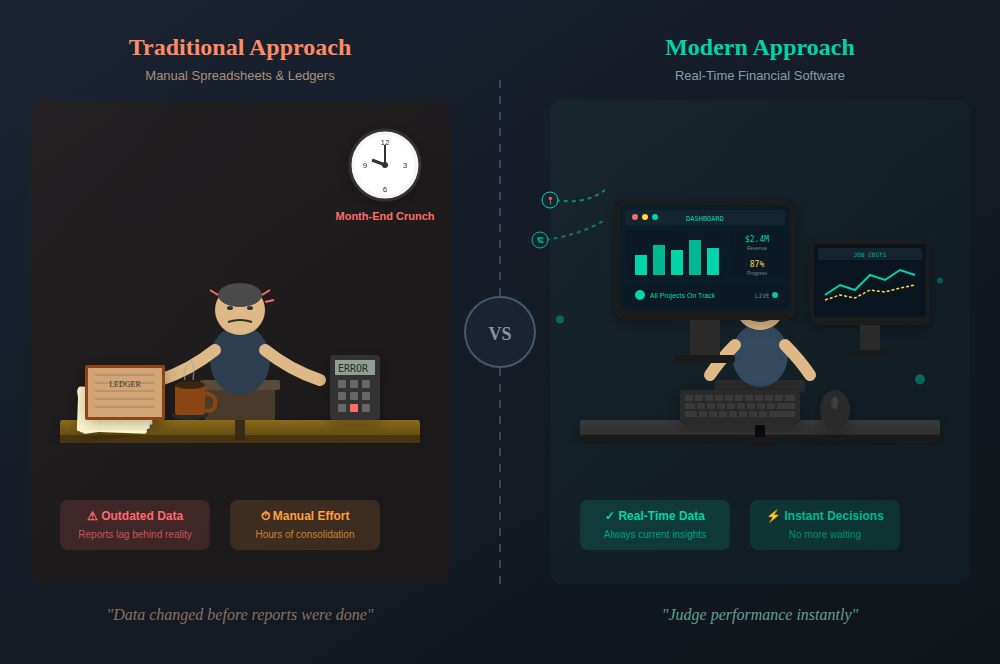
Back in the day, the financial reporting for all of this was done using spreadsheets and ledgers. CFOs had to manually consolidate data from job sites and make reports. This would create many issues. One notorious issue was that by the time CFOs got reports done, the situation on the ground, i.e., the data, had changed.
Modern construction companies are lucky to have specialized software for this now. The software has mechanisms to pull fresh data from every corner of a project, in-office or construction sites.
They allow CFOs to monitor construction finance reports, which are updated in real-time as the situation on jobsites regularly change. CFOs are able to judge how a job is performing instantly and make decisions accordingly, instead of waiting until month-end like in the traditional approach.
Some companies still operate the old way, though. They have someone who’s really good at Excel and pulling together data from different sources every month. But this approach starts to crumble when the company grows past a certain size or when that Excel-expert quits.
So, it’s a lifesaver to be using a good construction financial reporting software in today’s environment. This guide will introduce you to some options later on.
For now, let’s introduce you to some essential construction financial reports that CFOs monitor.
6 Major Types of Construction Financial Reports
| Report Type | What It Tracks | Why It Matters | Who Needs It |
| Work-in-Progress (WIP) | Spending, revenue, and remaining costs on active projects | Flags potential losses early on long-running projects | Banks, bonding companies |
| Cash Flow Statement | Money in vs. money out across operating, investing, and financing activities | You pay for materials/labor before clients pay you; retention holds 5-10% for months | Internal |
| Balance Sheet | Assets, liabilities, and equity at a point in time | Reveals overbillings and underbillings; shows overall financial health | Lenders, bonding companies |
| Aged Accounts Receivable | Unpaid invoices by age (0-30, 31-60, 61-90, 90+ days) | 90+ day invoices are high risk; prioritizes collection efforts | Internal |
| Aged Accounts Payable | What you owe vendors/subs by age | Prevents overdue payments that damage vendor relationships | Internal |
| Estimates vs. Actuals | Projected costs vs. actual costs | Exposes where bids go wrong; improves future estimates | Internal |
| Equipment Utilization | Billable hours and usage rates for owned equipment | Shows if buying vs. renting was the right call | Internal |
1. Work-in-Progress (WIP) Reports
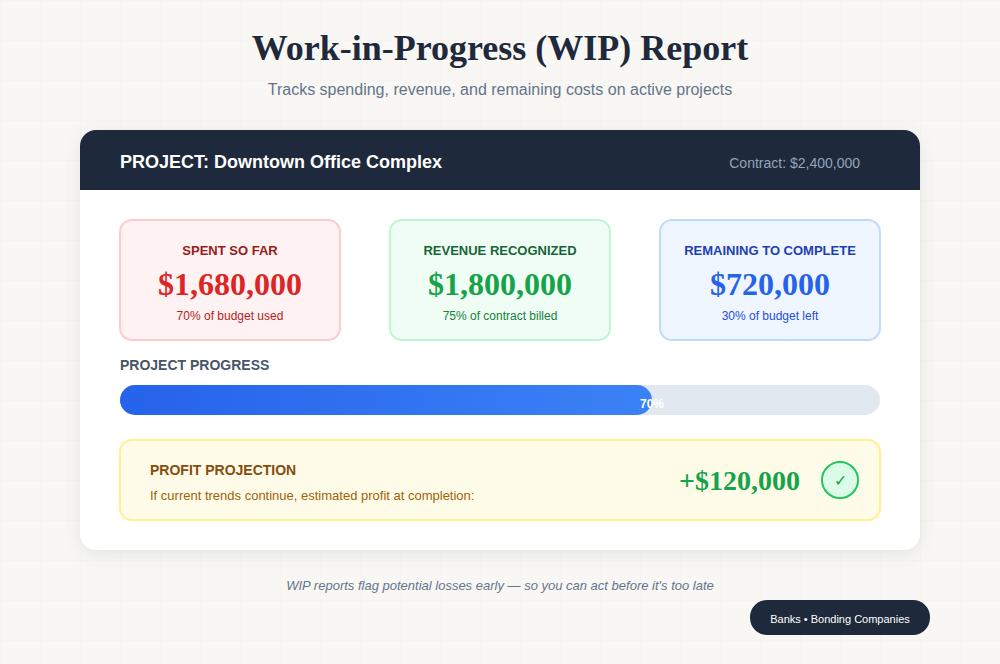
This report is construction-specific. You won’t find a WIP report in other lines of work.
As the name suggests, a work-in-progress report tracks active projects.
These reports show you how much you’ve spent so far on a project, how much revenue you’ve recognized, and what’s left to spend before the project wraps up.
Construction projects can last months or years. You cannot wait until the very end of a project to find out if it was profitable. WIP reports let you figure out whether you’re on track to make those profits. If you’re headed toward a loss, you still get a heads-up in advance to do something about it while there’s still time.
Beyond internal usage, you need WIP reports when taking loans from banks and bonding companies. They need to make sure you aren’t consistently overbilling or bleeding money on your projects, and the WIP report tells them that.
2. Cash Flow Statements
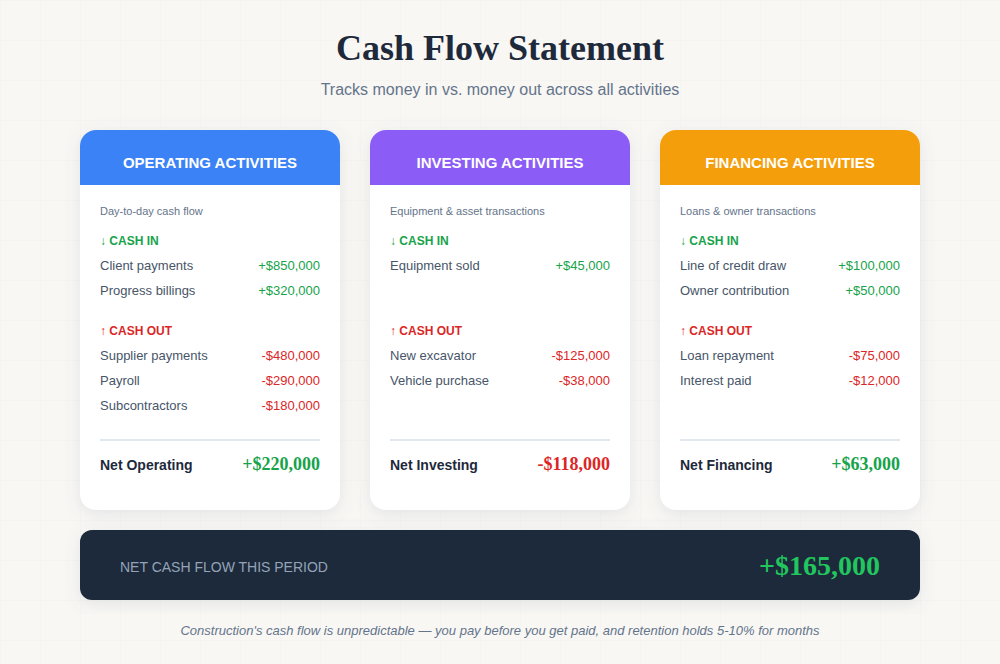
In simple words, a cash flow statement tells you how much cash came in and how much of it went out.
More specifically, a cash flow statement breaks money into three (or so) categories of activities:
- Operating activities: This includes your day-to-day flow of cash, for example, the money you collect from clients and pay suppliers and employees.
- Investing activities: This covers money, such as equipment purchases or sales.
- Financing activities: Loans, repayments, owner contributions, etc, come under this.
Construction has an unconventional cash flow, which warrants tracking, and cash flow statements let you do just that.
What’s unconventional, though?
Oftentimes, you have to pay for materials and labor before you get paid by the client.
Then you have retention. The client holds back money until the project is fully completed and approved. That can be 5-10% of the contract value just sitting there, sometimes for months after you’ve finished the work.
A cash flow statement makes sure you still have money to spend despite all of the ups and downs.
3. Balance Sheet
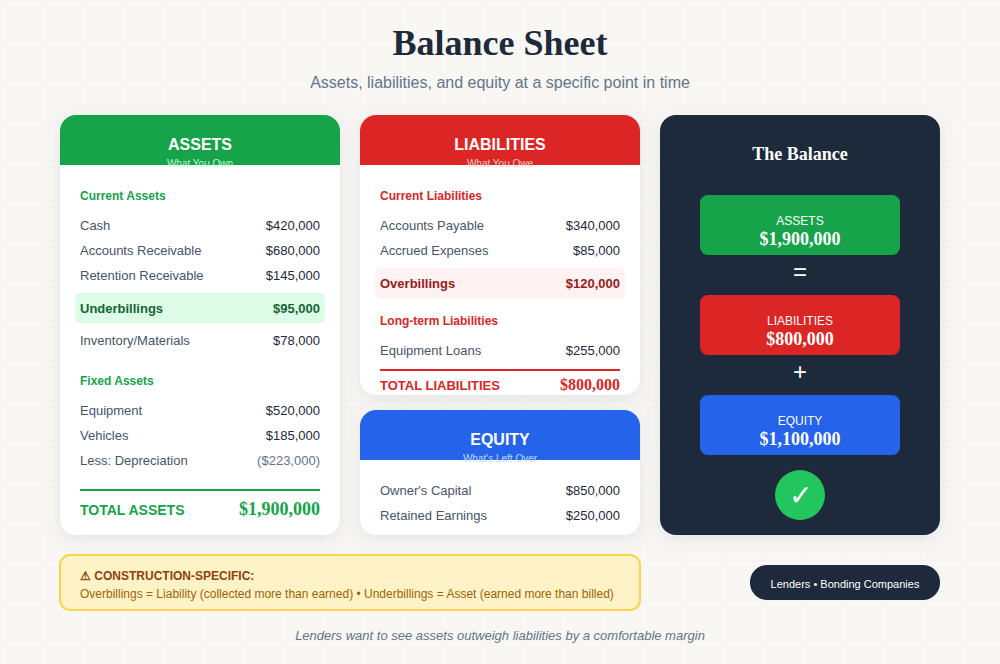
A balance sheet shows what you own, what you owe, and what’s left over at a specific point in time.
If you read that closely, you’d know those three things are just synonyms for assets, liabilities, and equity, respectively.
For those unaware, here’s what each of these includes:
- Assets: Cash, accounts receivable, equipment, and inventory
- Liabilities: Accounts payable, loans, and accrued expenses
- Equity: Whatever’s left after you subtract liabilities from assets
But again, a construction company’s balance sheet is different from that of others.
They’re mainly monitoring the balance sheet for overbillings and underbillings. Overbilling shows up as a liability because you have collected more than you’ve earned. Underbilling shows up as an asset because you’ve earned more than you’ve billed.
As for where else you need a balance sheet, the answer is lenders. When you’re trying to get bonds or secure a line of credit, your balance sheet needs to show lenders that your assets outweigh your liabilities by a comfortable margin.
4. Aged Accounts Receivable & Payable
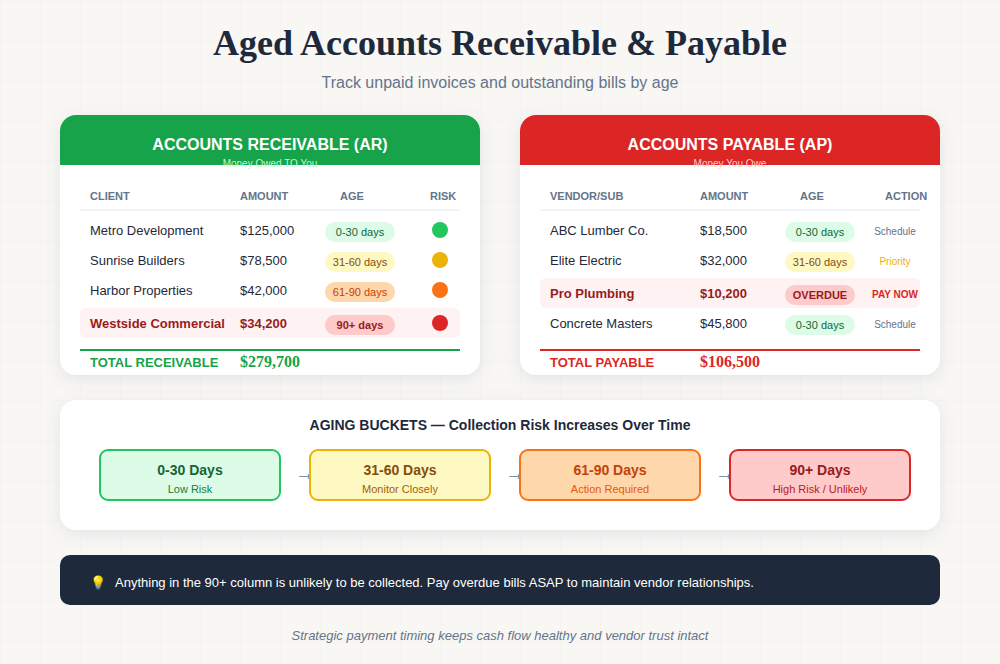
These are two reports.
The accounts receivable (AR) report lists every unpaid invoice you’ve sent. This list is typically organized by how long an invoice has been sitting there.
Typical aging buckets are 0-30 days, 31-60 days, 61-90 days, and over 90 days. Anything in the 90+ column should make you nervous because you’re less likely to collect that invoice.
On the other hand, the accounts payable (AP) report follows the same concept as AR. Except it tracks what you owe to vendors and subcontractors.
The report helps you pay your dues strategically, i.e., who needs to be paid and when. For instance, if the report shows $30K is due in 31-60 days, and $10K is already overdue, you need to pay that $10K asap before vendors, suppliers, or anyone you owe that money to lose interest in working with you anymore.
5. Estimates vs Actuals Report
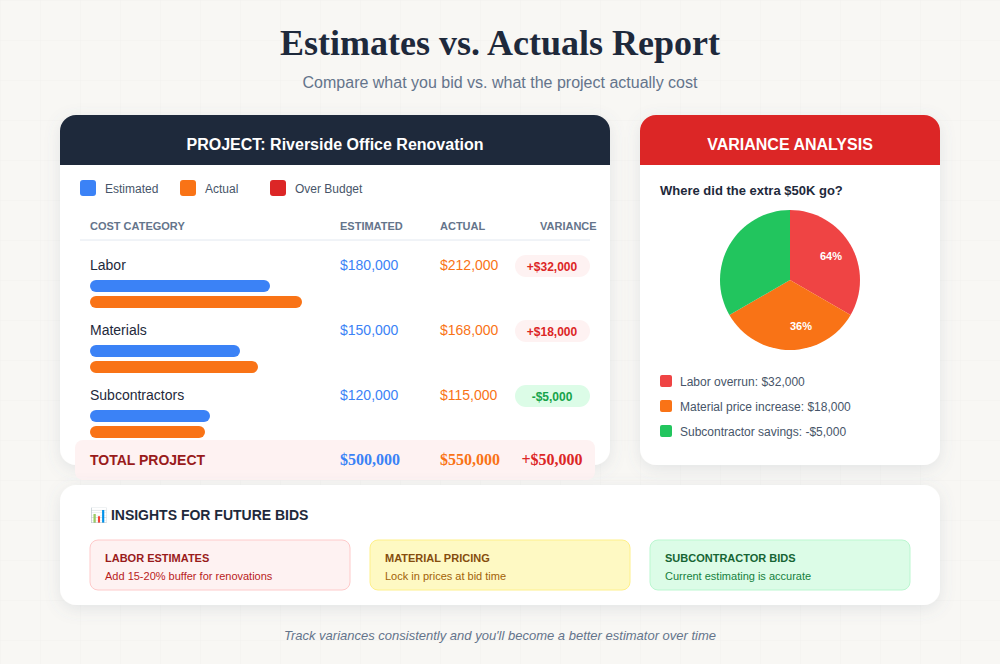
You bid on a project at $500K, and it ends up costing $550K. Where did the extra $50K go? Was it labor overruns? Material price increases? Change orders you didn’t bill for?
This situation is very common in construction projects. That’s why having a report to track what you thought a project would cost vs what it actually cost is extremely crucial.
It makes you a better estimator over time, too. You start seeing the specific estimates that make your bids prove wrong at the end. Or if your estimates are right, the report exposes operational problems that make the actual spending exceed estimates on every project.
6. Equipment Utilization Reports
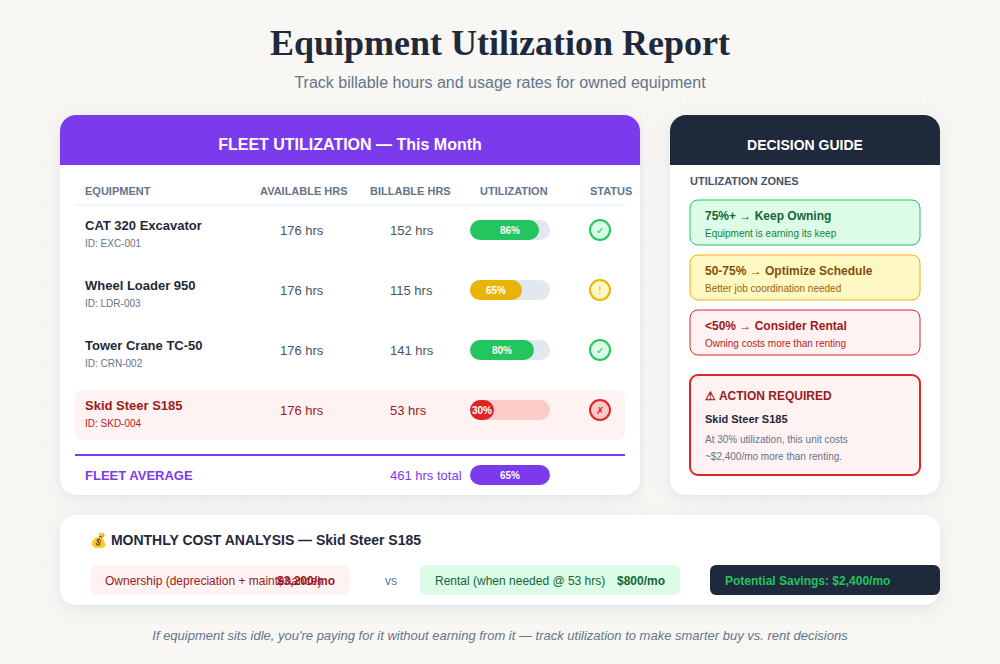
If you own equipment, you need to make sure it’s making you money. It shouldn’t be sitting idle mostly, because that’d mean your decision of purchasing it vs renting was wrong. That was an inefficient use of money.
Tools are billed in hours. Construction companies assign equipment to specific jobs and measure how many billable hours it logs. Some companies also track the utilization of equipment by project or just track overall usage across the fleet.
Either way, you get the data to decide whether the equipment should be owned, rented, or just needs to be scheduled better between jobs.
Best Practices for Construction Financial Reporting
Even with good construction financial reporting software, you need to follow certain best practices to operate as smoothly as possible. Here are some of them.
1. Separate Duties In Your Accounting Team
Most mistakes happen when one person is made to record everything. Also, how frauds happen, especially when the person entering invoices is the same person approving payments.
If you’re a small company with not enough staff, you can ask your project manager or an owner to step forward to review some reports.
2. Make Your Reports Scannable But Detailed
A good report shows the defining metrics up front. But it still has specific data to back up those defining metrics.
The point is to make it easy for stakeholders to tell if a project is profitable. They shouldn’t have to hunt for the essential information.
3. Keep Company-Level And Project-Level Reporting Separate But Connected
Always choose the construction reporting software that offers you visibility into both company-level and project-level reports.
Having only one of these views doesn’t tell you the entire story. The software should also let you easily switch between these two views.
4. Document Everything
You need to document everything, not just for the sake of reporting, but to prove numbers during an audit.
It’s not acceptable, let alone professional, to reconstruct from memory the change order that added three weeks to the schedule and $60K to the scope.
You need documentation to back such claims.
5. Set Up Alerts For Key Thresholds
Your construction accounting software needs to automatically notify you through alerts when certain conditions are met.
For instance, you need to be notified when a project has consumed 80% of the budget but is only 70% complete. Or when accounts receivable ages past 60 days.
7. Maintain A Cash Flow Forecast
Modern construction accounting tools have now made it possible to forecast what’s about to happen next month based on what happened last month.
If you can predict when big expenses are coming and when client payments should arrive, you can avoid situations where you have the work lined up but not the cash to pay for materials and labor.
Let Anterra Handle Your Construction Reports
The hard part in construction financial reporting is that most ERPs don’t offer flexible reporting. You have to settle for whatever canned reports they offer.
That isn’t practical. Every construction firm operates differently. Each has its own quirks. So your construction ERP should offer customizable financial reports.
But don’t worry if your ERP doesn’t offer that. Just plug in Anterra to your existing ERP and give it a proper business intelligence layer that your ERP should have included from the start.
You can build custom views for different roles in the dashboard builder. To build dashboards, you just need to drag widgets and arrange them however you want on the canvas. If a widget isn’t available, Anterra lets you build it from scratch. Then you apply filters and save the dashboard for the whole company or for yourself only.
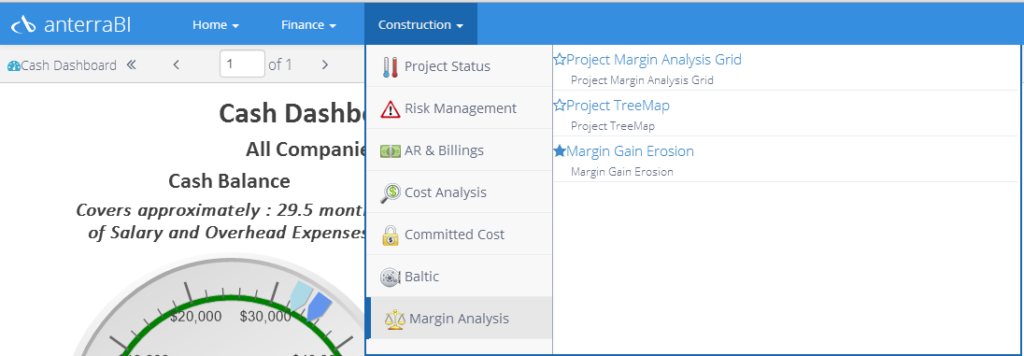
Then, when it’s time to generate reports, there are finance and construction-specific report groups. These groups basically list the same custom dashboards that you built. Each dashboard can generate different reports based on what you have set.
Simply click on a report, and it will load.
Book a demo with Anterra and experience professional construction financial reporting.